ELF 与进程内存结构
参考文献:
- 这个文章写得很好:ELF 格式简述 — Mark's DevOps 雜碎
- 也可以参考这个官方的 manual:elf(5) - Linux manual page
- 通读 Spec:refspecs.linuxfoundation.org/elf/elf.pdf:进度:还剩 78 页 Dynamic Section 到 94 页这部分还没有看,其他的都已经看过了。
- 动态链接、PLT及GOT « Leinux
ELF 的 Spec 在 1995 出了 Version 1.2 之后就再也没有更新过了。这不妨碍我们学习它,因为这正说明了它设计上的通用性。后续的更新都是通过扩展来支持的。我们可以看 Linux Foundation Referenced Specifications 这个网站里的 Processor Specific ELF documents 这一栏。
ELF 格式并不是 Linux 系统所独有的,其他 OS 也可以遵循 ELF 格式。
遵循 ELF 文件格式的文件叫做 Object file,也就是我们经常说的目标文件,目标文件可以分为以下几种类型:
- 可重定向文件(relocatable file):本身不可以执行,可以与其他目标文件去生成可执行文件或者共享目标文件。就是说,唯独没有办法再生成自己了。
- 可执行文件(executable file):不必过多解释。
- 共享目标文件(shared object file):
- 静态阶段:可以与其他可重定向文件或者共享目标文件一起生成其他目标文件;
- 动态链接阶段,可以和其他可执行文件一起生成一个 process image。
可执行文件和共享目标文件是一个 program 静态的表示,process image 是一个 program 动态的表示。
上面描述比较繁杂,可能会有歧义。
提供两种试图:
- 链接视图,给链接器看的,看到的是一个个的 Section^,因此:
- Program Header Table 是可选的;
- Section Header Table 是必须的;
- 执行视图,给操作系统看的,看到的是一个个的 Segment^,因此:
- Program Header Table 是必须的;
- Section Header Table 是可选的。
| ![[ELF.pdf#page=15&rect=181,175,464,352&color=annotate | ELF, p.15]] |
注意,只有 ELF Header 的位置是明确放在头部的,Program Header Table 和 Section Header Table 并不一定是图上的位置。
我们平时指的代码段堆栈段什么的,指的都是 Section。下面这个图非常精辟:
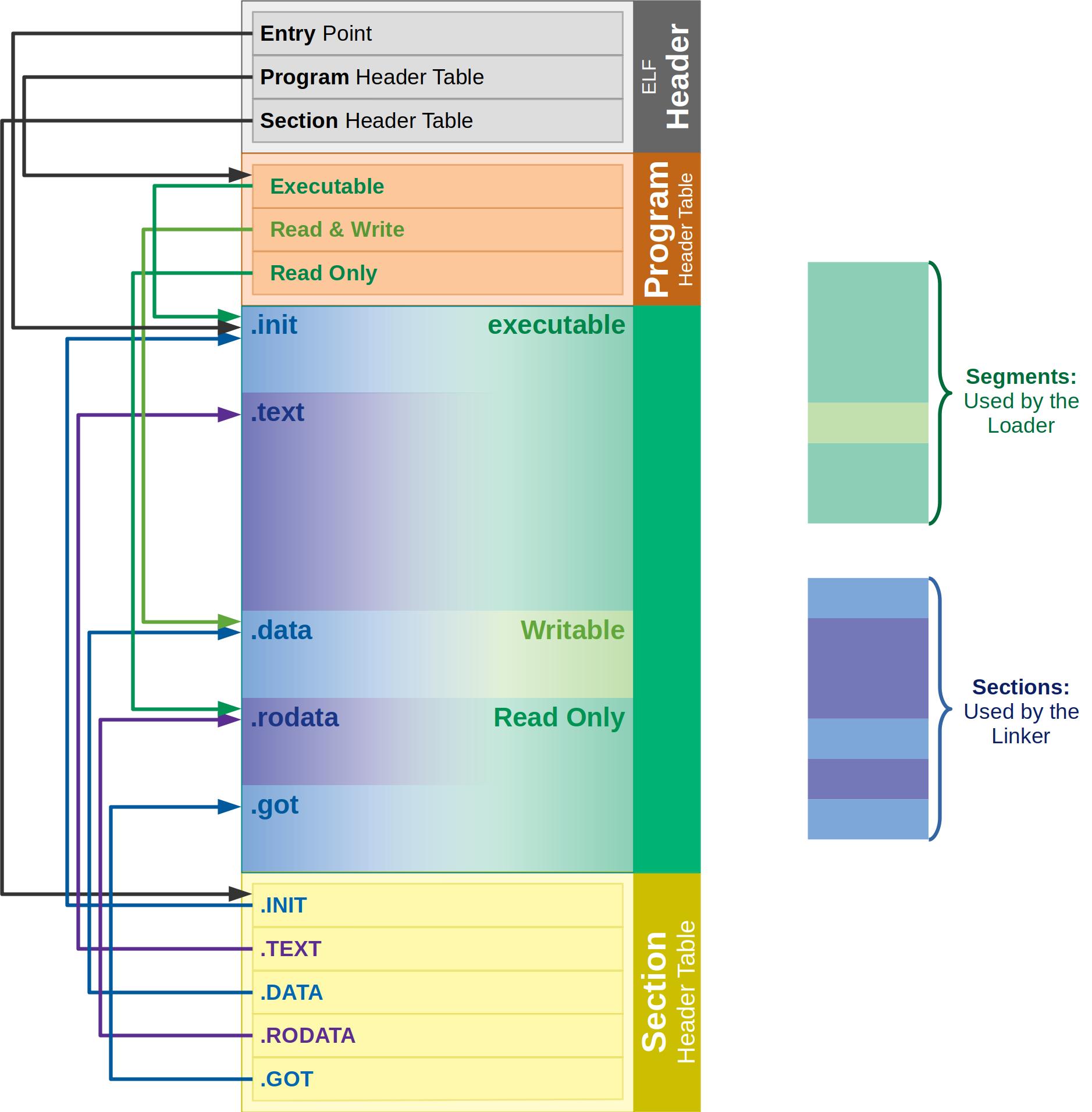
ELF 表示的是要在目标机器上执行的架构,而不是在构建机器上的架构。这也是交叉编译的由来。
ELF 里面的 field 最小是一个字节的大小,并不会使用以 bit 为单位的 field。
一个目标文件可以有多个同名的 Section。
Program Header Table
Section header string table section
进程的内存结构
进程的内存结构(text, rodata, data, bss 等等)是 ELF 格式规定的,和具体的编程语言是没有关系的:
- text(代码段):存机器指令;
- rodata(只读数据):字符串常量等;
- data(已初始化的全局变量)
- bss(未初始化的全局变量)
- heap(malloc/new 分配)
- stack(函数调用栈)
- mmap 区域(共享库、匿名映射等)
这些 section 其实是为了告诉操作系统应该怎么来分配内存,内核中这部分的逻辑在下面这个子系统中:
EXEC & BINFMT API, ELF
R:	Eric Biederman <ebiederm@xmission.com>
R:	Kees Cook <keescook@chromium.org>
L:	linux-mm@kvack.org
S:	Supported
T:	git git://git.kernel.org/pub/scm/linux/kernel/git/kees/linux.git for-next/execve
F:	Documentation/userspace-api/ELF.rst
F:	fs/*binfmt_*.c
F:	fs/exec.c
F:	include/linux/binfmts.h
F:	include/linux/elf.h
F:	include/uapi/linux/binfmts.h
F:	include/uapi/linux/elf.h
F:	tools/testing/selftests/exec/
N:	asm/elf.h
N:	binfmt
一些 Tips:
- Linux x86-64 的典型栈地址范围大约在:
0x00007fffxxxx0000附近。
从上往下依次是:
- 共享内存内核区:系统调用时会用到,是一片共享内存区,存了内核的代码;
- 栈区:栈向下生长;
- 未分配内存区;
- 堆区:堆是向上增长的;
- 未初始化的数据 .bss (Block Started by Symbol);
- 初始化的数据 .data;
- 文本,也就是程序的代码 .text。
bss 段不在可执行文件中。由系统初始化分配,举个直观的例子,现在有两段代码:
// program1
int ar[30000];
void main(){
	// something...
}

// program2
int ar[300000] = {1, 2, 3, 4, 5, 6 };
void main(){
	// something...
}
program2 编译后的可执行文件要比 program1 大得多。因为 program1 位于 bss 段,而 program2 位于 data 段。
为什么栈向下,堆向上(可以帮助记忆)?
人们对数据访问是习惯于向上的,比如在堆中 new 一个数组,是习惯于把低元素放到低地址,把高位放到高地址,所以堆向上生长比较符合习惯。而栈则对方向不敏感,一般对栈的操作只有 push 和 pop,无所谓向上向下,所以就把堆放在了低端,把栈放在了高端。
Section and segment / 段
段这个概念比较容易混淆,因为它的意思取决于语境,有时候指的是 section,有时候指的是 segment。
一个 segment 可能会包含多个 sections,这个信息可以通过 readelf -l 工具来查看。
- 代码段、数据段、堆栈段指的是 segment;
Don't mix-up the "section" in assembly code and the "segment" in x86 architecture, they are totally different things!
IA-32 Assembly Language Reference Manual
Particularly important information are (besides lengths):
- section: tell the linker if a section is either:
- raw data to be loaded into memory, e.g.
.data,.text, etc. - or formatted metadata about other sections, that will be used by the linker, but disappear at runtime e.g.
.symtab,.srttab,.rela.text
- raw data to be loaded into memory, e.g.
- segment: tells the operating system:
- where should a segment be loaded into virtual memory
- what permissions the segments have (read, write, execute). Remember that this can be efficiently enforced by the processor: How does x86 paging work?
Does a segment contain one or more sections?
Yes, and it is the linker that puts sections into segments.
In Binutils, how sections are put into segments by ld is determined by a text file called a linker script.
Once the executable is linked, it is only possible to know which section went to which segment if the linker stores the optional section header in the executable
linux - What's the difference of section and segment in ELF file format - Stack Overflow
The ELF format is an executable and linking format. Segments are used for the former, sections for the latter.
Once the binary is linked, sections can be completely discarded from it, and only segments are needed at runtime.
linux kernel - When is an ELF .text segment not an ELF .text segment? - Stack Overflow
Any given ELF file might have only segments, or only sections, or both segments and sections. In order to be executable it must have segments to load. In order to be linkable, it must have sections describing what is where.
assembly - Section vs. segment? - Stack Overflow
MacOS 遵循 ELF 文件的标准吗?
不遵循。
Link Editor / Dynamic Linker
分别是静态链接器和动态链接器。
ELF Header
作用:
- 在 ELF 文件的最开头,用来表示这是一个 ELF 文件。
- 描述整个文件是怎么组织的。
// QEMU:   include/elf.h
// Kernel: include/linux/elf.h
typedef struct elf32_hdr{
  // 表示这是一个 ELF 文件,全称:ELF Identification,也叫 Magic。
  // EI_NIDENT 大小一般为 16,也就是 16 个 bytes:
  // #define EI_NIDENT 16
  unsigned char	e_ident[EI_NIDENT];
  // 表示这个目标文件的类型:
  //  - ET_REL: 可重定向文件 relocatable file
  //  - ET_EXEC: 可执行文件 executable file
  //  - ET_DYN: 共享目标文件 shared object file
  //  - ET_CORE: core dump 文件
  Elf32_Half	e_type;
  // 表示指令集架构,x86 上是 EM_X86_64,ARM 上是 EM_ARM。
  Elf32_Half	e_machine;
  //
  Elf32_Word	e_version;
  // 如果是 0 的话,表示这个程序没有进入点;
  // 如果不是 0 的话,表示这个程序第一行指令的虚拟内存地址。
  Elf32_Addr	e_entry;  /* Entry point */
  // ph = program header,如果非 0,表示 program header 的地址
  Elf32_Off	e_phoff;
  // sh = section header,如果非 0,表示 section header 的地址
  Elf32_Off	e_shoff;
  Elf32_Word	e_flags;
  // ELF Header size
  Elf32_Half	e_ehsize;
  // program header table 里面一个 entry 的大小(所有 entry 大小相等)
  Elf32_Half	e_phentsize;
  // program header 里面 entry 的数量
  Elf32_Half	e_phnum;
  // section header table 里面一个 entry 的大小(所有 entry 大小相等)
  Elf32_Half	e_shentsize;
  // section header 里面 entry 的数量
  Elf32_Half	e_shnum;
  Elf32_Half	e_shstrndx;
} Elf32_Ehdr;
ELF_32 和 ELF_64 的结构是一样的,我们可以先以 ELF_32 为例来学习。
使用 readelf -h a.out 来查看一个 hello world 程序的 ELF Header:
- 可以看到前四个 Bytes 分别
7f, 45, 4c, 46,也就是0x7f, 'E', 'L', 'F',对的上; - Magic 就是 ELF Identification,可以看到长度为 16 个 Bytes 对的上;
- 有趣的是,可以看 OS/ABI 这里,是 Unix-System V,这说明我们可以直接看 ELF Spec 里对应的内容,因为对于 Linux 系统也是适用的。
❯ readelf -h a.out
ELF Header:
  Magic:   7f 45 4c 46 02 01 01 00 00 00 00 00 00 00 00 00
  Class:                             ELF64
  Data:                              2's complement, little endian
  Version:                           1 (current)
  OS/ABI:                            UNIX - System V
  ABI Version:                       0
  Type:                              DYN (Position-Independent Executable file)
  Machine:                           Advanced Micro Devices X86-64
  Version:                           0x1
  Entry point address:               0x1050
  Start of program headers:          64 (bytes into file)
  Start of section headers:          13976 (bytes into file)
  Flags:                             0x0
  Size of this header:               64 (bytes)
  Size of program headers:           56 (bytes)
  Number of program headers:         13
  Size of section headers:           64 (bytes)
  Number of section headers:         31
  Section header string table index: 30
ELF Identification / Magic
这个 ELF Header 里的 field 是和架构无关的。
- 前四个 Byte 分别是 0x7f, 'E', 'L', 'F';
- 第五个 Byte,也就是
EI_CLASS域(e_ident[EI_CLASS]),指定了这个目标文件是 32bit 还是 64bit 的; - 第 6 个 Byte,
EI_DATA:指定类似大端还是小端。 - 第七个 Byte,
EI_VERSION,和 ELF Header 里的 e_version 比较接近。
Section Header Table / Sections
一个 section 会对应到一个 section header entry 上(一个 header entry 可能没有任何对应的 section)。
sections 之间的区域是不重合的。
一个 section header 是这样的(可以把一个 section 看作是一个 section 的描述符 descriptor):
typedef struct
{
  // 是一个指向 section header string table 中某一个 entry 的指针
  Elf32_Word	sh_name;		/* Section name (string tbl index) */
  // 这个得好好说道说道:
  //
  Elf32_Word	sh_type;		/* Section type */
  // SHF_WRITE: 表示这个 section 包含在程序执行过程中可写的数据
  // SHF_EXECINSTR:表示这个 section 包含可执行的机器指令
  Elf32_Word	sh_flags;		/* Section flags */
  // 如果这个 section 要在内存中,那么这是这个 section 的起始地址。
  Elf32_Addr	sh_addr;		/* Section virtual addr at execution */
  // 在这个文件中,这个 section 起始偏移位置(相对于文件开始)。
  Elf32_Off	sh_offset;		/* Section file offset */
  // section 大小,无须多言
  Elf32_Word	sh_size;		/* Section size in bytes */
  // 如果这个是个符号表 section,那么这个字段是
  // 第一个非本地符号的 index。
  Elf32_Word	sh_link;		/* Link to another section */
  // 如果这个是个符号表 section,那么这个字段是
  // 最后一个本地符号的 index。
  Elf32_Word	sh_info;		/* Additional section information */
  // 对齐相关,可以先不关注
  Elf32_Word	sh_addralign;		/* Section alignment */
  // 有的 section 是特殊 section,是一个 table 用来放许多个固定大小的 entries
  // 这个 field 就是表示这个 section 里面每一个 entry 的 size。
  Elf32_Word	sh_entsize;		/* Entry size if section holds table */
} Elf32_Shdr;
ELF Section Types
这么多年过去了,Linux 内核代码里还是仅仅声明了这些类型的 ELF Header,和 1995 的 ELF Spec 完全一致。
#define SHT_NULL	0
#define SHT_PROGBITS	1
#define SHT_SYMTAB	2
#define SHT_STRTAB	3
#define SHT_RELA	4
#define SHT_HASH	5
#define SHT_DYNAMIC	6
#define SHT_NOTE	7
#define SHT_NOBITS	8
#define SHT_REL		9
#define SHT_SHLIB	10
#define SHT_DYNSYM	11
#define SHT_NUM		12
| ![[ELF.pdf#page=25&rect=70,79,525,337&color=annotate | ELF, p.25]] |
-
SHT_PROGBITS/ Section.text,.data:这个 section 类型表示这个 section 里的信息是 program 自定义的,格式和内涵完全取决于 program。 -
SHT_SYMTAB/SHT_DYNSYM:表示这个 Section 是一个符号表。 -
SHT_STRTAB:表示这是一个字符串表,比如存一些 Section 名称或者符号的名称什么的。一个 object file 可以包含多个此类型的 section。 -
SHT_RELA:表示这个段和重定向是强相关的,一个目标文件可能会有几个这个段。 -
SHT_HASH:Symbol hash table. -
SHT_DYNAMIC:这个段和动态链接相关,留着动态链接相关的信息。 -
SHT_NOTE:存储着一些用来标记这个文件的一些信息。 -
SHT_NOBITS/.bss/.sbss:这个段不占任何这个文件的空间,其他的和 PROGBITS 很像。 -
SHT_REL:和SHT_RELA很像,表示这个段和重定向是强相关的,一个目标文件可能会有几个这个段。REL和RELA区别在于不同 ISA 会使用不同的模型,也就是说这是 processor-specific 的,一个 Processor 只会选用一种模型。
有一些特殊 section,是被预定义好的(这些 section 之所以前面有一个 . 其实是表示这个 section 是系统预留的特殊 section,程序当然可以定义新的 section):
| ![[ELF.pdf#page=29&rect=152,342,541,596&color=annotate | ELF, p.29]] |
下面捡几个重要的段来讲讲:
.bss Block Started by Symbol
包含一些未初始化的全局变量,因为未初始化,所以系统可以在 load image 时再将其进行初始化,因此这个段占用空间大小为 0,其类型为 SHT_NOBITS。
.data / .data1
初始化的全局变量区。
.debug
符号 debug 所需信息。
.dynamic / PT_DYNAMIC
动态链接所需信息,提供给动态链接器看的。是一个由下面 entry 组成的列表:
| ![[ELF.pdf#page=78&rect=108,506,543,622&color=annotate | ELF, p.78]] |
.line
行号信息。描述了源代码和汇编代码之间的行号映射关系。
rodata / rodata1
只读数据,放一些常量,比如一些字符串常量。
- 常量不一定就放在
rodata里,有的立即数直接编码在指令里,存在代码段.text中。 - 如果有多个符号同时被赋予一个常量值,那么把常量放在这里有助于节省空间,因为可以让所有符号都指向这里。
- 对于字符串常量,编译器会自动去掉重复的字符串,保证一个字符串在一个可执行文件 (EXE/SO) 中只存在一份拷贝。
- 因为不会变,所以在执行时,其所在内存区域是多个进程间时共享的。
.shstrtab / .strtab
.shstrtab 保存着所有 section 的名字,这样 section header table 里每一个 entry 的 name 字段就可以指向这里来描述这个 section 的名字。
.strtab 和 .shstrtab 类似,都是存储 string 的,唯一的区别是存的是符号的 string 而不是 section name。和符号表 .symtab 配合,符合存储符号表里每一个符号的名字。
两者的 String Table 数据存储格式是一样的,只不过存储的内容不同。组织格式和使用方式下图很清楚:
| ![[ELF.pdf#page=31&rect=49,266,563,554&color=annotate | ELF, p.31]] |
.symtab / Symbol Table
存在所有符号的符号表。格式:
typedef struct elf32_sym {
  Elf32_Word	st_name;
  Elf32_Addr	st_value;
  Elf32_Word	st_size;
  unsigned char	st_info;
  unsigned char	st_other;
  Elf32_Half	st_shndx;
} Elf32_Sym;
| ![[ELF.pdf#page=32&rect=72,419,576,538&color=annotate | ELF, p.32]] |
-
st_name:index to.strtab,表示这个符号的名字; -
st_value:这个符号的初始值(也可以是一个地址 address,取决于上下文);- 在 relocatable file 里,这个值可能表示
st_shndx所表示的段在整个文件中的偏移地址。 - 在 executable / shared object file 里,这是一个绝对的虚拟地址。
- 在 relocatable file 里,这个值可能表示
-
st_size:这个符号占用空间的大小。 -
st_info:符号类型和一些属性。比如可以包含:- 这个符号的可见度:local 仅限于这个目标文件、所有要 combine 的目标文件都可以看到等等。
- 这个符号的类型:object(数组、变量等等), function(函数), section(主要是为了重定向用的)
-
st_shndx:表示这个 symbol 和一个 section 有关,可能在重定向时有用。
.text
代码段,也就是所有的指令。
.bss
Although it occupies no space in the file, it contributes to the segment's memory image. Normally, these uninitialized data reside at the end of the segment, thereby making p_memsz larger than p_filesz.
Program Header Table / Segments
涉及到可执行文件和共享对象文件。这些文件中的 Program Header Table 包含了一个数据结构数组,每一个数据结构用来描述一个 segment。segment 和 section 的关系:一个 segment 可能包含多个 sections。
// ELF spec 和 Linux kernel 都如此定义
typedef struct elf32_phdr {
  // segment type
  Elf32_Word	p_type;
  // 这个 segment 位置相对于文件初始地址的 offset
  Elf32_Off	p_offset;
  // 这个段第一个字节在内存中的虚拟地址
  Elf32_Addr	p_vaddr;
  // 可能 x86 并不需要?
  Elf32_Addr	p_paddr;
  // 这个 segment 在 file image 中的大小(偏静态?),可能是 0
  Elf32_Word	p_filesz;
  // 这个 segment 在内存中的大小(偏运行时?),可能是 0
  Elf32_Word	p_memsz;
  // 这个 segment 一些 flag
  Elf32_Word	p_flags;
  // alignment
  Elf32_Word	p_align;
} Elf32_Phdr;
p_type:
-
PT_LOAD:loadable segment, the bytes from the file are mapped to the beginning of the memory segment. 如果p_memsz比p_filesz大,那么内存中多余空间会填 0;p_filesz不可能比p_memsz大;A program to be loaded by the system must have at least one loadable segment.p_memsz比p_filesz大的原因可以参考.bss^ 章节。 -
PT_DYNAMIC:dynamic linking information,按下不表; -
PT_INTERP:Interpreter?详见 Program Interpreter^。 -
PT_NOTE:补充信息。 -
PT_PHDR:用来描述 program header table 自身
Program Interpreter / PT_INTERP
An executable file that participates in dynamic linking shall have one PT_INTERP program header element. During exec (BA_OS), the system retrieves a path name from the PT_INTERP segment and creates the initial process image from the interpreter file's segments. That is, instead of using the original executable file's segment images, the system composes a memory image for the interpreter. It then is the interpreter's responsibility to receive control from the system and provide an environment for the application program.
注意,这和我们 ./test.sh 能执行 shell 脚本没有关系,这个解释器通常是动态链接器,负责在程序执行前进行必要的准备工作。 上面的英文文本也说了:participates in dynamic linking。更多可以看 GOT^。
Segment Permissions
不出所料,老三样:
| ![[ELF.pdf#page=73&rect=179,182,544,291&color=annotate | ELF, p.73]] |
For example,
- typical text segments have read and execute —but not write —permissions.
- Data segments normally have read, write, and execute permissions.
代码段
Text segments contain read-only instructions and data, typically including the following sections. Other sections may also reside in loadable segments; these examples are not meant to give complete and exclusive segment contents:
| ![[ELF.pdf#page=75&rect=69,581,542,689&color=annotate | ELF, p.75]] |
可以看到,PLT^ 位于代码段。
数据段
| ![[ELF.pdf#page=75&rect=71,425,541,509&color=annotate | ELF, p.75]] |
可以看到,GOT^ 位于数据段。
Relocation / 重定向
Relocation is the process of connecting symbolic references with symbolic definitions. 就是把一个文件中的符号引用和另一个文件中的符号定义联系起来:
- 可重定向文件一定要有描述文件内 section 内容的信息,是提供 symbolic definition 的一方;
- 可执行文件和共享对象文件是提供 symbolic reference 的一方。
重定向项(Relocation Entries)
| ![[ELF.pdf#page=36&rect=102,455,544,595&color=annotate | ELF, p.36]] |
r_offset:
- 如果是可重定位文件(relocatable file),它的值表示:从该段(section)开头算起,到需要进行重定位的存储单元之间的 字节偏移量。
- 如果是可执行文件(executable)或共享库(shared object),它的值表示:需要进行重定位的那个存储单元的虚拟地址。
r_info:
- 这个成员提供了进行重定位所需的符号表索引等内容。例如,一个
call指令的重定位条目会包含被调用函数的符号表索引。
Relocation Section
A relocation section references two other sections: a symbol table and a section to modify. The section header's sh_info and sh_link members, described in "Sections'' above, specify these relationships.
.rel.text / .rela.text
These sections hold relocation information. Conventionally, name is supplied by the section to which the relocations apply. Thus a relocation section for .text normally would have the name .rel.text or .rela.text.
Global symbols and weak symbols
Global symbols 只能有一个条目,不能同时有两条 global symbols。
weak symbols 可以存在多个,并且可以和 global symbols 共存,并且 global 的优先级更高。
Dynamic Linking 动态链接
动态链接对于符号引用的解析可以发生在程序初始化阶段,也可以发生在执行中。
下面段会参与到动态链接中 .dynsym, .dynstr, .interp, .hash, .dynamic, .rel, .rela, .got and.plt。
.dynsym, .dynstr
.dynsym 是为了动态符号表。
.dynstr holds strings needed for dynamic linking, most commonly the strings that represent the names associated with symbol table entries. 估计是和 .dynsym 配合的。
Position-Independent Code (PIC)
Shared object 包含的都是 PIC,也就是说代码和这个 shared object 会被 map 到 process image 的哪一片内存地址空间是没有关系的,无论 map 到哪一片区域都能正确执行。
PIC 里一半都是通过相对寻址来避免和绝对地址相关的。
执行阶段与视图
The .init and .fini sections contribute to the process initialization and termination code.
在程序加载时,系统会把一个文件里的 segment 拷贝成为一个内存中的 segment(只是映射,什么时候系统真正读取到内存中,取决于 OS 的实现了)。
一个执行中程序的内存视图是这样的:
| ![[ELF.pdf#page=97&rect=66,319,549,696&color=annotate | ELF, p.97]] |
一个 .so 也就是共享对象文件内的不同段之间的顺序和偏移在映射到 process image 的时候应该是被保持的,这是因为 .so 中都是 PIC 的代码。
pmap 命令应该如何来。
pmap / 进程内存布局
可以用来查看一个正在运行中程序的内存布局,简洁命令:
sudo pmap <pid>
输出类似下面这种:
1751:   nvidia-persistenced --persistence-mode
0000000000400000    176K r-x-- nvidia-persistenced
000000000062b000     28K r---- nvidia-persistenced
0000000000632000      4K rw--- nvidia-persistenced
0000000000633000      4K rw---   [ anon ]
0000000001c30000    132K rw---   [ anon ]
00007fa84ce00000    308K r-x-- libnvidia-cfg.so.550.54.15
00007fa84ce4d000   2044K ----- libnvidia-cfg.so.550.54.15
00007fa84d04c000     72K r---- libnvidia-cfg.so.550.54.15
00007fa84d05e000     12K rw--- libnvidia-cfg.so.550.54.15
00007fa84d061000      8K rw---   [ anon ]
00007fa84d231000      4K r---- librt.so.1
00007fa84d232000      4K r-x-- librt.so.1
00007fa84d233000      4K r---- librt.so.1
00007fa84d234000      4K r---- librt.so.1
00007fa84d235000      4K rw--- librt.so.1
00007fa84d236000      8K rw---   [ anon ]
00007fa84d238000    152K r---- libc.so.6
00007fa84d25e000   1364K r-x-- libc.so.6
00007fa84d3b3000    332K r---- libc.so.6
00007fa84d406000     16K r---- libc.so.6
00007fa84d40a000      8K rw--- libc.so.6
00007fa84d40c000     52K rw---   [ anon ]
00007fa84d419000      4K r---- libpthread.so.0
00007fa84d41a000      4K r-x-- libpthread.so.0
00007fa84d41b000      4K r---- libpthread.so.0
00007fa84d41c000      4K r---- libpthread.so.0
00007fa84d41d000      4K rw--- libpthread.so.0
00007fa84d41e000      4K r---- libdl.so.2
00007fa84d41f000      4K r-x-- libdl.so.2
00007fa84d420000      4K r---- libdl.so.2
00007fa84d421000      4K r---- libdl.so.2
00007fa84d422000      4K rw--- libdl.so.2
00007fa84d42f000      8K rw---   [ anon ]
00007fa84d431000      4K r---- ld-linux-x86-64.so.2
00007fa84d432000    148K r-x-- ld-linux-x86-64.so.2
00007fa84d457000     40K r---- ld-linux-x86-64.so.2
00007fa84d461000      8K r---- ld-linux-x86-64.so.2
00007fa84d463000      8K rw--- ld-linux-x86-64.so.2
00007ffe73c2d000    132K rw---   [ stack ]
00007ffe73cd2000     16K r----   [ anon ]
00007ffe73cd6000      8K r-x--   [ anon ]
 total             5152K
可以看到权限这边有 5 个 bit,遵循 ----- 的格式,也就是 rwx(s/p)-,前三个很好理解,后面两个是 s/p 位和空位(第五位在很多系统里固定是 -,用于老早以前的额外标志位(现在基本不用)),第四位也就是共享映射和私有映射,我们拆开来看下:
-
p(默认值,一般不会标出来,会以-来代替):private,写操作使用写时复制 (COW),修改不会影响其他进程; -
s:shared,共享映射: 修改对所有映射该区域的进程可见。
代码段相关:
-
r-x--:私有可执行代码段 (最常见); - (不存在)
r-xs:共享可执行代码段。其实动态了解的那些共享的库比如libc.so也是私有的而不是共享的。
数据段相关:
-
r----:这种一般就是.rodata,放一些常量,比如说字符串常量 “Hello World” 什么的。 -
rw---:这种可能就是.data,也就是数据段。
堆栈段(全局的,一个 process image 只有一个):
-
rw---:这个权限并且后面名字带一个[ stack ]的,就是堆栈段,一般在地址空间的高位。
PLT 和 GOT 其实就隐藏于数据段和代码段当中,所以 pmap 里是显示不出来的,毕竟 pmap 关心并输出的是运行视图,而不是链接视图。
为什么堆栈段在内存地址空间的高位?
堆向上增长,符合我们申请空间的直觉,栈的话用户不感知,所以向下增长也无妨。
栈在顶端,堆在底端,中间有一个巨大的空洞,这个空洞大小从 0x000000… 到 0x00007f… 之间可以看到大概有 100TB 的空洞,所以理论上来说肯定是够用的(毕竟是虚拟内存 VMA 而不是物理内存)。
readelf
可以用来查看一个 segment 会包含哪些 sections(下面输出来自 readelf -l):
Elf file type is EXEC (Executable file)
Entry point 0x404620
There are 9 program headers, starting at offset 64

Program Headers:
  Type           Offset             VirtAddr           PhysAddr
                 FileSiz            MemSiz              Flags  Align
  PHDR           0x0000000000000040 0x0000000000400040 0x0000000000400040
                 0x00000000000001f8 0x00000000000001f8  R E    0x8
  INTERP         0x0000000000000238 0x0000000000400238 0x0000000000400238
                 0x000000000000001c 0x000000000000001c  R      0x1
      [Requesting program interpreter: /lib64/ld-linux-x86-64.so.2]
  LOAD           0x0000000000000000 0x0000000000400000 0x0000000000400000
                 0x000000000002b6c8 0x000000000002b6c8  R E    0x200000
  LOAD           0x000000000002bba0 0x000000000062bba0 0x000000000062bba0
                 0x0000000000006aa0 0x00000000000076e8  RW     0x200000
  DYNAMIC        0x0000000000031e28 0x0000000000631e28 0x0000000000631e28
                 0x00000000000001b0 0x00000000000001b0  RW     0x8
  NOTE           0x0000000000000254 0x0000000000400254 0x0000000000400254
                 0x0000000000000020 0x0000000000000020  R      0x4
  GNU_EH_FRAME   0x000000000002a6cc 0x000000000042a6cc 0x000000000042a6cc
                 0x0000000000000ffc 0x0000000000000ffc  R      0x4
  GNU_STACK      0x0000000000000000 0x0000000000000000 0x0000000000000000
                 0x0000000000000000 0x0000000000000000  RW     0x10
  GNU_RELRO      0x000000000002bba0 0x000000000062bba0 0x000000000062bba0
                 0x0000000000006460 0x0000000000006460  R      0x1

 Section to Segment mapping:
  Segment Sections...
   00
   01     .interp
   02     .interp .note.ABI-tag .hash .dynsym .dynstr .gnu.version .gnu.version_r .rela.dyn .rela.plt .init .plt .plt.got .text .fini .rodata .eh_frame_hdr
   03     .eh_frame .ctors .dtors .data.rel.ro .dynamic .got .got.plt .data .bss
   04     .dynamic
   05     .note.ABI-tag
   06     .eh_frame_hdr
   07
   08     .eh_frame .ctors .dtors .data.rel.ro .dynamic .got
可以看到下面的每一个 segment 编号对应上面的一个 segment:
-
.plt,.plt.got这些 PLT 段在 02 segment,对应 r-x 权限,是代码段,很合理; -
.got,.got.plt这些 GOT 段在 03 segment,对应 rw- 权限,是数据段,很合理。
.init / .fini
This section holds executable instructions that contribute to the process initialization code. When a program starts to run, the system executes the code in this section before calling the main program entry point (called main for C programs). 这个其实就是 gcc 的 __attribute__((constructor)) 实现的底层方式。
This section holds executable instructions that contribute to the process termination code. When a program exits normally, the system executes the code in this section.

求物之妙,如系风捕景,能使是物了然于心者,千万人而不一遇也。